How I Built a Personal OS That Works Across AI Agents
How I use Obsidian, GitHub, local models, and a task dashboard to give Claude, Codex, OpenClaw, and Town the same context.
I use several AI agents every day. Claude helps me think through products and research. Codex works with me inside codebases. OpenClaw runs as a remote assistant. I recently added a Town agent to the mix.
Each tool has its own memory, instructions, and chat history. Without a shared system, I end up explaining the same things over and over: what I am building, which goals matter right now, what I already decided, how I like to work, and which facts are safe to use.
Worse, the agents can develop different versions of me. One knows that a project changed direction. Another is still following a plan I abandoned two weeks ago. A third produces a polished answer based on context that is no longer true.
I built a Personal OS to solve that problem. It is a private GitHub repository full of Markdown files, with Obsidian as the interface I use to read and edit them. Almost everything I work on starts or ends there.
One source of truth for every agent
There are plenty of second-brain templates and Personal OS structures out there. Most assume one person working in one app, or one assistant with its own memory. I needed something I could point any agent at, whether it was running on my laptop or in the cloud.
I tried keeping the context in Google Drive first. It worked for documents I wanted to read myself, but it was clunky as an operating system for agents. Google Drive does not treat Markdown as a first-class format, and managing the same context across a growing collection of Google Docs created more filing work than it removed.
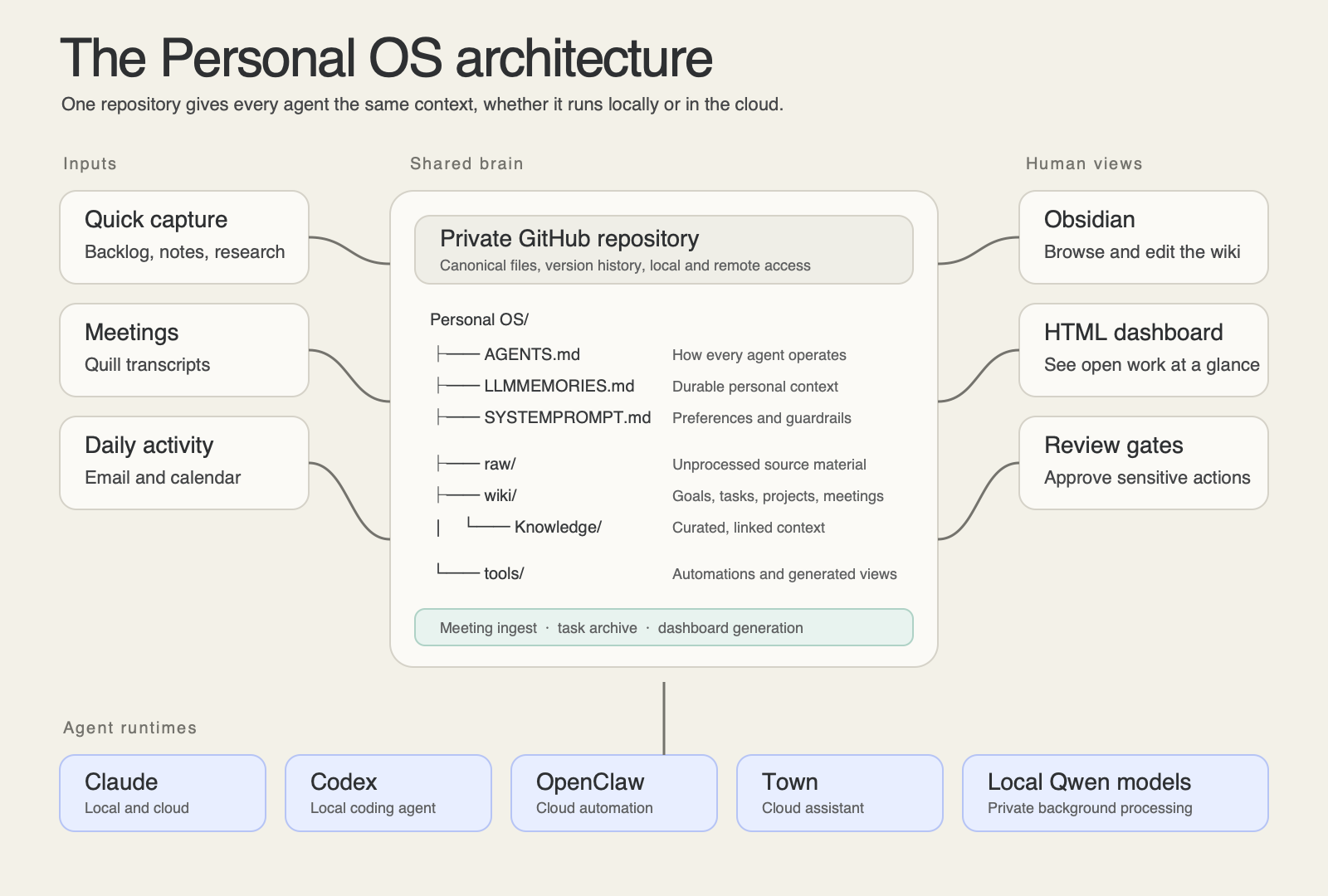
A GitHub repository gave me a shared filesystem, version history, and a consistent entry point for every agent. The repository has three layers.
The first is operating context. A small set of files explains who I am, what I am working toward, how the repository works, and how I want an agent to behave. When an agent enters the folder, it reads those files first.
The second is raw material. Meeting transcripts, research, notes, and loose ideas land in an inbox where the original source stays intact.
The third is a curated wiki. Agents turn that raw material into organized notes about projects, companies, people, decisions, and recurring workflows. They update an existing canonical page when one already exists instead of creating another slightly different copy.
GitHub keeps the private repository available to both local and remote agents. Claude, Codex, OpenClaw, and Town can read the same files and the same instructions for how to use them.
That choice also keeps the system portable. Because the useful context lives in files, I can switch tools without leaving it behind. I experiment with new models and agent harnesses all the time, including local and open weight models. I can spin up a new tool, point it at the repository, and avoid rebuilding my context from scratch.
My task system lives beside the knowledge
The Personal OS is also where I track work.
I can use a custom OpenClaw skill to drop an unfinished shower thought into a backlog without deciding where it belongs. A local agent processes the backlog on my laptop, checks it against my current goals, looks for duplicates, and either updates an existing project or creates a structured task with a priority, status, due date, and next action.
This matters because most of my dropped balls do not come from forgetting that a project exists. They come from losing a follow-up inside a meeting note, leaving a decision in a chat thread, or ending a work session without defining the next move.
Putting tasks beside the underlying context changes the handoff. A task can point directly to the project plan, research, meeting notes, and previous decisions. The next agent does not receive a vague instruction like “work on Task A.” It can see what Task A is, what changed, what is blocked, and what a finished next step looks like.
Markdown underneath, dashboard on top
Markdown is durable, readable, and easy for agents to edit. But I found that I was getting overwhelmed and lost in a sea of files. For a view of thirty open loops at once, I needed something more visual.
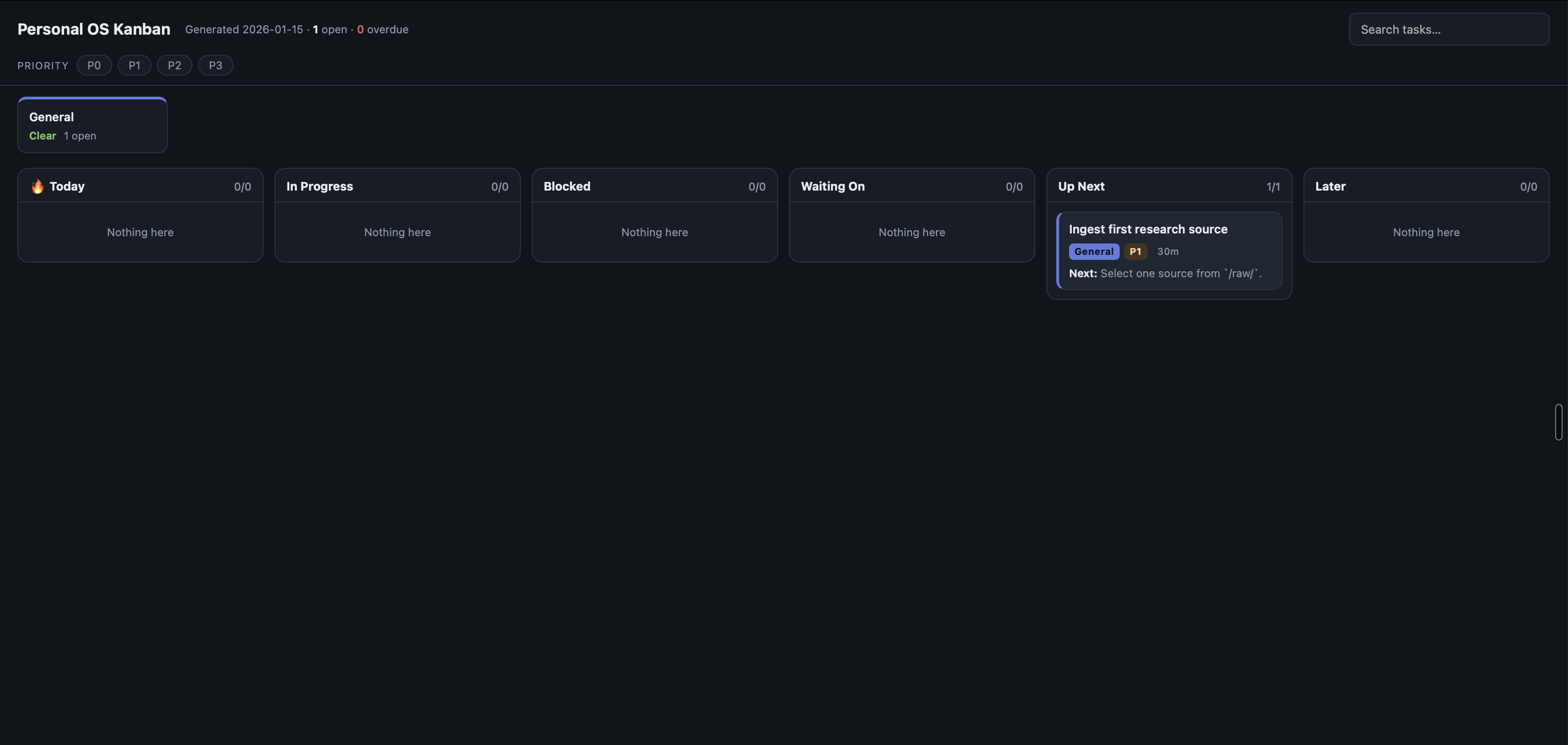
I built a local HTML dashboard that generates a Kanban board from the task files. It shows what is in progress, blocked, waiting on someone else, up next, or intentionally deferred. It also flags overdue work and gives me a project-level view of where attention is accumulating.
The dashboard is read-only by design. I didn't want to create and manage a second task database. When I click a card, it opens the underlying note in Obsidian. Markdown remains the source of truth, and the browser gives me the visual layer I was missing.
That pattern has become a rule for the rest of the system. Store the truth in a plain format, then build better views on top of it.
The system closes its own loops
Whenever I catch myself repeating the same maintenance step, I look for a way to automate it.
Completed tasks are one example. When a task's status changes to done, a local script moves the file out of the active task folder and into an archive. The dashboard regenerates from the remaining open tasks, so completed work disappears from the board without creating another cleanup job for me.
OpenClaw handles a broader reconciliation loop. Every day, it reviews my email and calendar and updates the wiki with anything that changed. If the system finds evidence that an open task already happened, such as an email I sent or a meeting that took place, it marks the task complete. I do not have to return to the task list and update it by hand.
That automation is intentionally different from giving an agent permission to do everything. Reading activity and reconciling state can happen in the background. Sending a message, publishing something, or making another consequential external change still requires my approval.
Meetings now update the wiki on their own
Meetings used to create one of the worst gaps in my workflow. I would leave a call with useful context, a few follow-ups, and every intention of writing it down. Then the next meeting would start.
Now I use Quill, an open-source, local alternative to Granola. Quill records my microphone and system audio as separate tracks, then transcribes them on my Mac. The audio and transcript stay on the machine.
When the transcript is ready, a local automation picks it up. Qwen3-Coder runs through LM Studio on my laptop, cleans and summarizes the conversation, checks the existing vault for relevant projects and company names, and writes a structured meeting note into the right part of the wiki. The pipeline also turns follow-ups into tasks and flags sensitive meetings for manual review instead of filing them automatically.
Quill handles local recording and transcription. Qwen3-Coder turns the transcript into durable knowledge.
By the time I return to the Personal OS, the call is no longer an isolated transcript. It has been connected to the project it affects, the people involved, and the next actions I need to take.
Obsidian is where I work with the system
I could edit these files in any text editor, but I use Obsidian because it makes a folder of Markdown files feel like a wiki.
Wikilinks let a meeting connect to a project, a project connect to a goal, and a task connect to the decision that created it. Backlinks show where a note is being used. Search is fast. I can follow the structure myself while an agent edits the same files.
I do not spend much time making the vault aesthetically perfect. Agents handle all of the sorting and filtering. The system earns its keep when it helps me recover context, make a decision, or finish something.
The ideas I borrowed
I started by adapting systems that other people had shared.
Aman Khan’s Personal OS shaped the task layer, especially backlog processing and goal-aware prioritization.
Andrej Karpathy’s LLM Wiki gave me the raw-source and curated-wiki model. His framing is useful: Obsidian is the IDE, the LLM is the programmer, and the wiki is the codebase.
Bill Mongan’s private AI knowledge base showed how a GitHub-backed vault could carry canonical instructions and context across multiple AI systems.
I borrowed from all three, then changed the system through daily use. The task schema got stricter. The dashboard appeared because I needed a faster way to see open work. Meeting ingestion became local because I wanted the pipeline to run without sending every transcript to a cloud model. I save those tokens for more advanced tasks. Rules around privacy, source material, and external actions grew out of mistakes I wanted the system to stop repeating.
How to get started
Start with a private repository that contains:
- a file that tells agents how the system works
- a file with your goals and current priorities
- an inbox for raw notes and source material
- a curated wiki for the knowledge worth keeping
- a task folder with explicit next actions
I published a privacy-safe starter version of my setup on GitHub. It uses fictional placeholder data, includes the agent instructions and task structure, and comes with the local Kanban dashboard.
Use the Personal OS starter repository
Clone it into a private repository, open the folder in Obsidian, and point your preferred agent at the instructions. Then change it as you use it. The system became valuable to me because it stopped being someone else’s template and started reflecting how I actually work.